Mini Performance

Finish Standard level with a fast little Doly show.

Build a mini performance that combines movement, eyes, arms, lights, timing, Repeat, and speech.

Duration 9 min
Level Standard
Progress Not Started
  1. Add an Eye Expression block under Start block. Choose HAPPINESS and EXCITED. Keep Start set to previous completed.
  2. Add a Repeat block below it. Set Repeat to 2 times and Start to instant so the side-to-side move begins with the excited eyes.
  3. Inside the first Repeat, add Rotate Left and Rotate Right. Set both angles to 10°, attach Drive Speed to each turn, and set both speeds to 100.
  4. Below the first Repeat, add Rotate Right. Set its angle to 0 for a full 360° spin, attach Drive Speed, and set speed to 100.
  5. Add Arm Angle below the spin. Set Side to Both, Angle to 180, and Start to instant. Attach Arm Speed & Brake and set speed to 10 with Brake set to No.
  6. Add a second Repeat block and set it to 2 times. Inside it, build a blink: Light, Delay, black Light, Delay.
  7. Choose any bright first Light color, set both Delays near 500 ms, and set the second Light color to black (#000000).
  8. Add one more Eye Expression block below the blink. Choose MISC and BLINK SLOW. Set Start to instant.
  9. Add a Say block at the end. Type a short thank-you phrase, such as: Thank you! Set Start to instant.

Practice here anytime. Connect a Doly to run your code on the real robot.

Lesson Workspace

Drag and connect blocks to build your program.

Need help?

  • Set the first Repeat block to instant so the side-to-side move starts with the excited eyes. Keep the turn blocks inside it set to previous completed.
  • This is the Standard showcase lesson. It combines many ideas, but each part still has one job.
  • Drive Speed is attached to the Rotate blocks. It does not go under Start by itself.
  • Arm Speed & Brake is attached to Arm Angle. It controls how the arm movement behaves.
  • The blink blocks must be inside the second Repeat do area.
  • The final Say text is your choice. Try a short phrase like: Thank you!

Eye

Eye

Eye blocks control how Doly’s eyes look and move.

Eye Expression

Use this block to change Doly’s eye expression.

Eye Expression: Choose the mood group for Doly’s eyes. Type: Choose the exact animation inside that mood group. Start: Choose when this block begins. “previous completed” waits for the block before it to finish. “instant” starts right away.

Eye Expression preview Preview coming soon

Sound

Sound

Sound blocks let Doly play sounds or speak words.

Sound

Use this block to play a sound.

Sound Type: Choose the sound category. Play: Choose the exact sound from that category. Start: Choose when this block begins. “previous completed” waits for the block before it to finish. “instant” starts right away.

Sound preview Preview coming soon

Say

Use this block to make Doly speak.

Say: Write the words Doly should say. The text can be up to 255 characters. Start: Choose when this block begins. “previous completed” waits for the block before it to finish. “instant” starts right away.

Say preview Preview coming soon

Drive

Drive

Drive blocks control how Doly moves, turns, and reaches positions.

Drive Distance

Use this block to move Doly by a set distance.

Drive: Set how far Doly should move. The distance is in millimeters (mm). 1 inch = 25.4 mm. Start: Choose when this block begins. “previous completed” waits for the block before it to finish. “instant” starts right away. Modifier Blocks: Drive Direction, Drive Speed

Drive Distance preview Preview coming soon

Rotate Left

Use this block to turn Doly left.

Rotate Left: Set how many degrees Doly should turn left. The angle can be 0 to 359 degrees. from center: Choose how Doly turns. Checked means Doly turns around its center by moving both tracks in opposite directions. Unchecked means one track stays stopped while the other track moves. Start: Choose when this block begins. “previous completed” waits for the block before it to finish. “instant” starts right away. Modifier Blocks: Drive Direction, Drive Speed

Rotate Left preview Preview coming soon

Rotate Right

Use this block to turn Doly right.

Rotate Right: Set how many degrees Doly should turn right. The angle can be 0 to 359 degrees. from center: Choose how Doly turns. Checked means Doly turns around its center by moving both tracks in opposite directions. Unchecked means one track stays stopped while the other track moves. Start: Choose when this block begins. “previous completed” waits for the block before it to finish. “instant” starts right away. Modifier Blocks: Drive Direction, Drive Speed

Rotate Right preview Preview coming soon

Direction

Use this modifier block to choose Doly’s drive direction.

Direction: Choose Forward or Reverse. Compatible Blocks: Drive Distance, Rotate Left, Rotate Right, Drive Speed Modifier Blocks: Drive Speed

Direction preview Preview coming soon

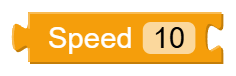
Speed

Use this modifier block to set Doly’s drive speed.

Speed: Set how fast Doly drives. The speed can be 1 to 100. Compatible Blocks: Drive Distance, Rotate Left, Rotate Right, Drive Direction Modifier Blocks: Drive Direction

Speed preview Preview coming soon

Arm

Arm

Arm blocks control Doly’s arm positions.

Arm Angle

Use this block to move Doly’s arm to a set angle.

Arm Angle: Set the arm position angle. The angle can be 0 to 225 degrees. Side: Choose which arm should move: Both, Left, or Right. Start: Choose when this block begins. “previous completed” waits for the block before it to finish. “instant” starts right away. Modifier Blocks: Arm Speed & Brake

Arm Angle preview Preview coming soon

Speed & Brake

Use this modifier block to control Doly’s arm speed and hold setting.

Speed: Set how fast the arm moves. The speed can be 1 to 100. Brake: Choose whether Doly should hold the arm at its final position. “Yes” keeps the arm locked in place. “No” lets it release after moving. Compatible Blocks: Arm Angle

Speed & Brake preview Preview coming soon

Lights

Lights

Light blocks control Doly’s arm light colors.

Light

Use this block to set Doly’s arm light color.

Light Color: Choose the light color. Side: Choose which light should change: Both, Left, or Right. Start: Choose when this block begins. “previous completed” waits for the block before it to finish. “instant” starts right away.

Light preview Preview coming soon

Time

Time

Time blocks add pauses between actions.

Delay

Use this block to pause the routine.

Delay ms: Set how long Doly should wait before continuing. The time is in milliseconds (ms). The value can be 5 to 60000. 1000 ms = 1 second. Start: Choose when this block begins. “previous completed” waits for the block before it to finish. “instant” starts right away.

Delay preview Preview coming soon

Loops

Loops

Loop blocks repeat a group of actions.

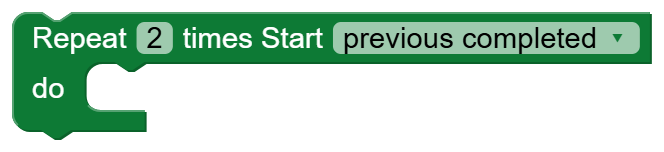
Repeat

Use this block to repeat actions.

Repeat: Set how many times the actions should run. The value can be 1 to 65535. Start: Choose when this block begins. “previous completed” waits for the block before it to finish. “instant” starts right away. do: Place the action blocks you want to repeat here.

Repeat preview Preview coming soon